From disconnected information to governed intelligence.
Explore the 7-stage architectural pipeline, epistemic uncertainty state machine, and full-resolution system diagrams that turn siloed hospital observations into longitudinal patient context.
Deterministic Ingestion → Context Synthesis → Governed Drafting
Information Sources
Ingests clinical encounters, diagnostic lab reports, pharmacy orders, nurse observations, and scanned progress notes from disparate departmental systems.
Distinguishing source records, derived context, and generated text.
A core principle of clinical safety is never confusing a primary medical observation with an AI-generated draft.
Primary Source Records
Raw, immutable empirical observations generated by hospital devices, LIS specimen analyzers, and signed clinician encounters. Stored with full payload integrity.
Derived Longitudinal Context
Synthesized projections of the patient’s history: encounter timelines, baseline comparisons, and 7 explicit epistemic missingness states. Never overwrites original source data.
Generated Review Drafts
AI-compiled progress note drafts, clinical briefings, and summaries. Clearly marked as drafts with interactive citation anchors, requiring human clinician sign-off.
The 7 Governed InformationStates
Verified empirical observation with timestamp, source system ID, and clinician/analyzer attribution.
Active diagnostic order or specimen in transit awaiting laboratory or radiology completion.
External report or referral document cited in clinical prose but not yet attached to the record.
Zero structured observations found across hospital departments; never silently assumed normal.
Historical observation exists but exceeds the clinical safety validity window for current dosing.
Two authoritative sources report discrepant values; both spans are surfaced for physician resolution.
Preliminary observation or prior order replaced by an amended or newly signed clinical record.
How Helixis Clinical Intelligence Works End-to-End
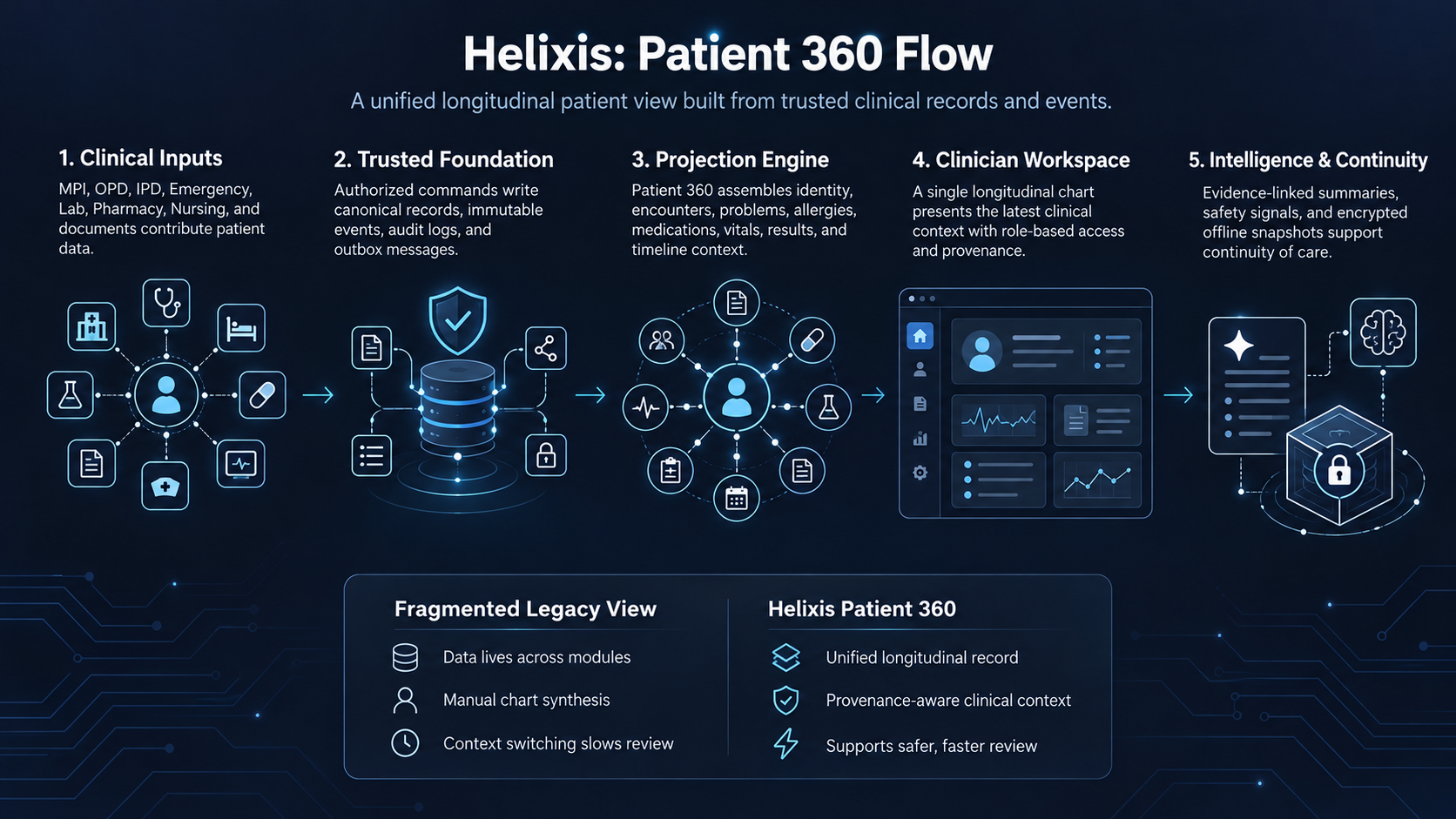
Strong healthcare systems explain the clinical workflow with real product views and clear language. Below is the complete 5-step flow—from hospital-wide data collection and longitudinal Patient 360 assembly to the clinician review workspace and continuous record updates.
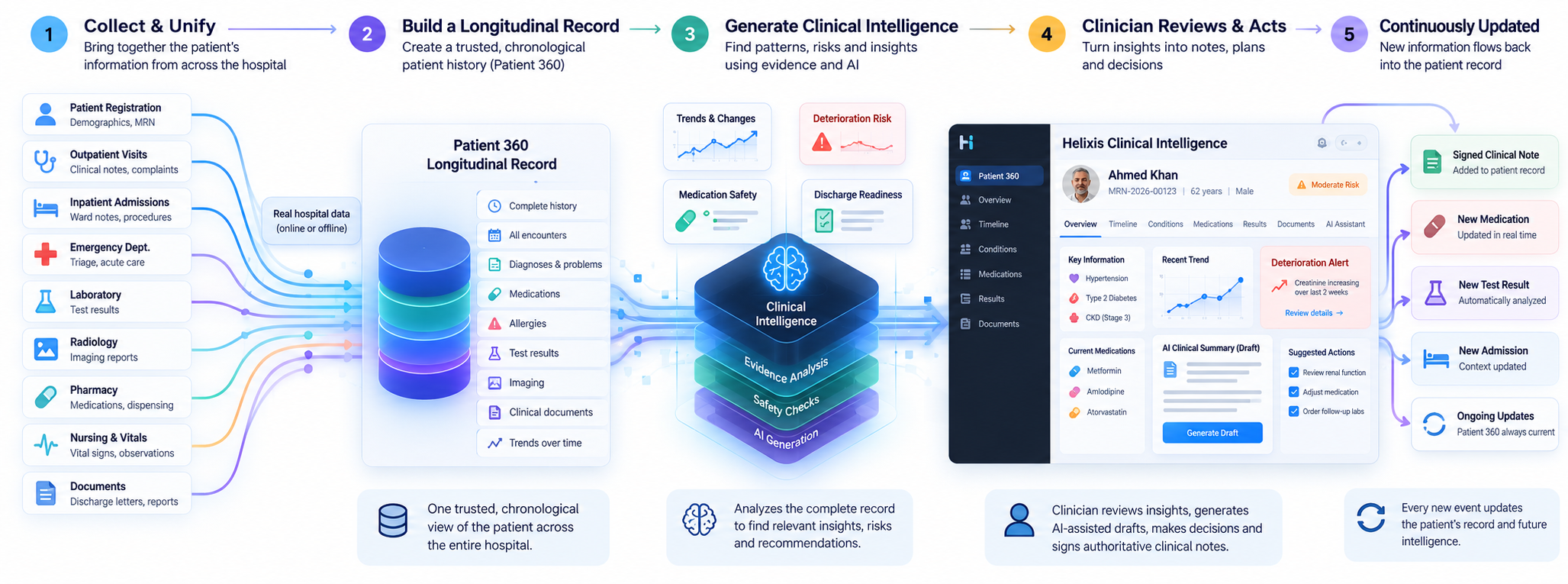
Collect & Unify
Brings together patient registration, outpatient visits, inpatient admissions, emergency care, lab results, radiology, pharmacy, nursing vitals, and clinical documents.
Build a Longitudinal Record
Creates a trusted, chronological Patient 360 history uniting encounters, diagnoses, medications, allergies, test results, imaging, and longitudinal trends.
Generate Clinical Intelligence
Analyzes the complete record to surface trends and changes, deterioration risks, medication safety checks, and discharge readiness.
Clinician Reviews & Acts
Presents real product views with key information, deterioration alerts, AI clinical summary drafts, and suggested actions for clinician review and sign-off.
Continuously Updated
Signed clinical notes, new medications, verified lab results, and new admissions flow directly back into Patient 360 in real time.
Patient 360: Real Product Views & Projection Architecture
Explore how clinical data from across the hospital is validated, unified into the Patient 360 longitudinal chart, and presented inside the Clinician Copilot workspace—replacing fragmented legacy module switching.
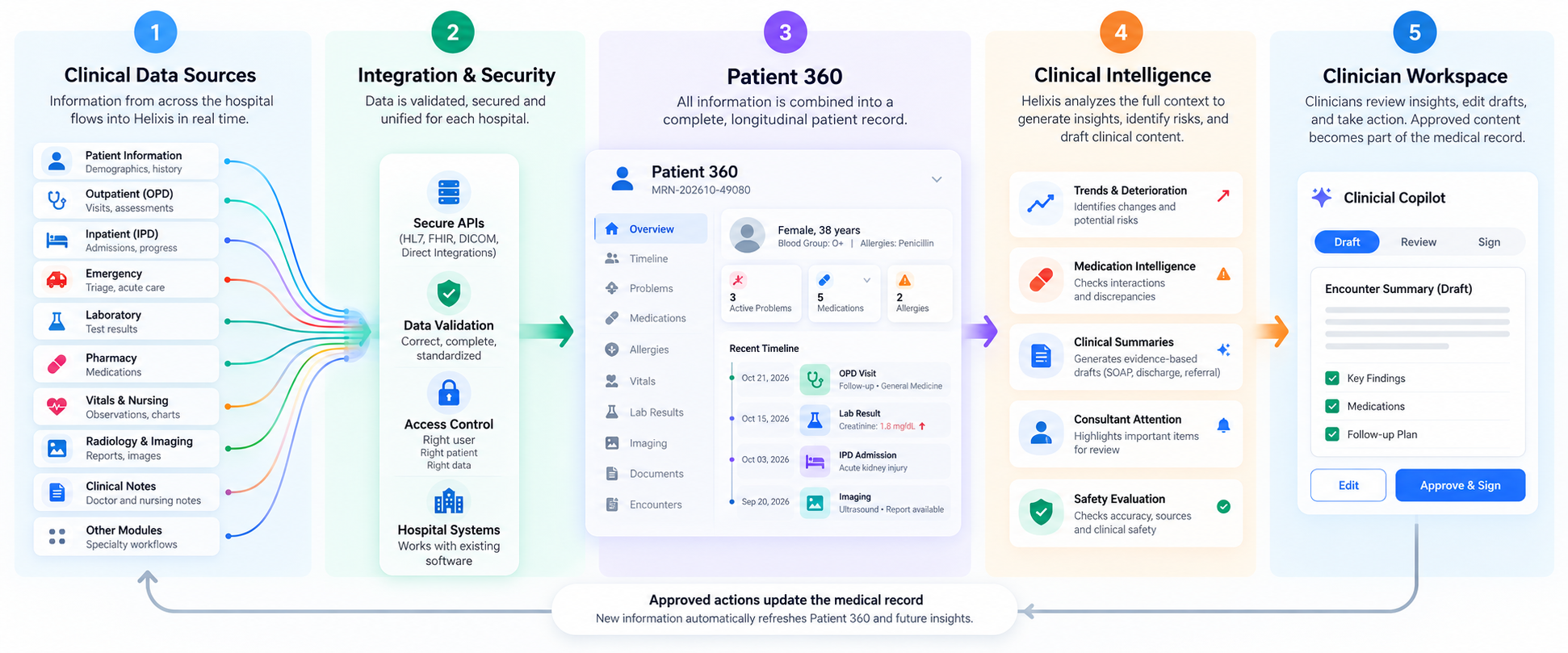
Clinical Data Sources
- Patient Information & History
- Outpatient (OPD) & Inpatient (IPD)
- Emergency Triage & Acute Care
- Laboratory, Pharmacy & Radiology
- Nursing Vitals & Clinical Notes
Integration & Security
- Secure APIs (HL7, FHIR, DICOM)
- Automated Data Validation
- Role-Based Access Control
- Works with Existing Hospital Software
Patient 360 Record
- Unified Longitudinal Patient View
- Active Problems, Meds & Allergies
- Chronological Encounter Timeline
- Lab Results, Vitals & Imaging
Clinical Intelligence
- Trends & Deterioration Detection
- Medication Interaction Checks
- Evidence-Based Clinical Summaries
- Consultant Attention & Safety Checks
Clinician Workspace
- Clinical Copilot (Draft, Review, Sign)
- Key Findings & Follow-Up Plan
- Clinician Edit, Approve & Sign
- Approved Actions Refresh Patient 360
See the clinical context come together.
Explore a guided, interactive Helixis AI demonstration using synthetic patient information. Test the longitudinal Patient 360 workspace, trace citations, and physician sign-off gates firsthand.